
Short answer
Most MyPascoConnect failures are one of four things: the wrong launchpad address (no dsbpc), a personal Microsoft or Google account already signed in to the browser, a cached old session or autofilled old password, or a genuine outage. The first three you can fix in under two minutes. For an outage, status.classlink.com shows live component status, and a classmate who is signed in proves it is not one. This page is ordered by how often each cause is the real problem, not by how easy it is to describe.
Outages
Is MyPascoConnect down? How to check in one minute
A district-wide outage is the rarest cause and the easiest to check. ClassLink runs a public status page at status.classlink.com covering LaunchPad, My Apps, My Files, the Google and Azure sign-in integrations and the mobile apps, with a 31-day incident history; on 12 September 2026 every component was operational and it listed no incidents since 29 August. You can subscribe to it by email or SMS. ClassLink's own help desk (helpdesk@classlink.com, 888-963-7550) can answer platform questions but cannot touch a Pasco account.
Two more things have their own status. If only the myLearning tile fails, the fault is Canvas (Instructure), not the launchpad. If a parent's Pasco One app fails, that is myStudent (Focus), which never went through ClassLink at all. A whole class failing at once is the tell for a real outage; one person failing is an account or device.
Source: ClassLink Status
Fixes by symptom
Find your symptom
| What you see | What is usually happening | Fix |
|---|---|---|
| Page reloads to the login screen in a loop | A personal Microsoft or Google account is signed in and the SSO handoff keeps bouncing | Open a private window and sign in there once. If it works, sign out of the personal account in your normal browser. |
| "Invalid username or password" | Usually the username, not the password | Students use the student ID number, not an email. Staff use the employee account. See password help. |
| Credentials fail on every attempt, new student or new hire | Account not provisioned yet | Normal in the first days of term or after a transfer. The office can confirm whether the account exists. No reset helps yet. |
| Launchpad loads but tiles are blank or missing | Tiles are assigned per school, grade, course and role | Not a fault. A missing required app is a teacher request. |
| A tile opens then immediately signs out | Stale cached session for that app, or a bookmark that skipped the sign-on | Clear cookies for that app's domain only, then reopen from the launchpad. |
| A tile opens and asks for a different username | That app is not linked to the district identity | Single sign-on did not fail. Use that app's own login. |
| Works at school, fails at home | Device auto-login at school masks a forgotten password | At home you need the actual district password. Ask the teacher if you never learned it. |
| Works at home, fails at school | Network filtering or a VPN | Turn off any VPN. On school Wi-Fi, report it; filtering is district-side. |
| iPad returns to the login page repeatedly | Safari's Prevent Cross-Site Tracking blocks the sign-on cookie | Settings → Safari → turn it off, or use Chrome. School-managed iPads may have it locked. |
| Nobody in the class can get in | District-side or ClassLink outage | Stop troubleshooting your device. Check status.classlink.com and school announcements. |
In order
How to troubleshoot a MyPascoConnect login that will not work
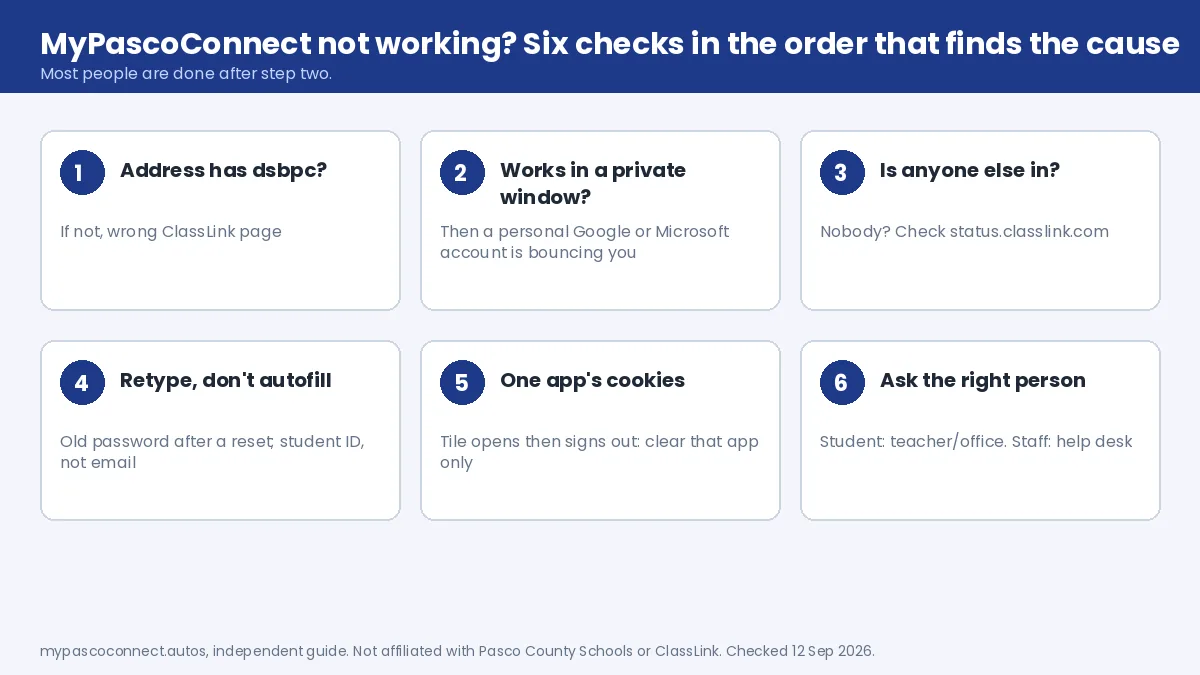
Six steps, in the order that finds the cause fastest. Most people are done after step two.
Check the address for dsbpc
Pasco links one launchpad from its Students page: login.classlink.com/my/dsbpc. A ClassLink page that asks you to search for a district is the generic entry point, and credentials fail there no matter how correct they are.
Try once in a private window
If it works in an incognito window, the account is fine and a personal Google or Microsoft account in your normal browser is answering the sign-on instead of the school one. Sign out of it, or keep a separate browser profile for school.
Ask whether anyone else is in
A classmate or colleague who is signed in right now rules out an outage. If nobody in the class can get in, stop troubleshooting your device; check status.classlink.com and school announcements instead.
Retype the credentials rather than autofilling
Students type the student ID number, not an email. Browsers keep offering the old password after a district reset. Delete what is in the box and type it fresh.
Clear cookies for one app, not the whole browser
A tile that opens then signs out is a stale session for that app only. Clear that domain's cookies and reopen it from the launchpad, never from a bookmark, because the bookmark skips the sign-on.
Then it's the account, and someone has to touch it
Students: the teacher of the course or the front office. Staff: the district technology help desk with your employee ID. Nothing you clear or reinstall will fix an account that is not provisioned or has a changed password.
Mobile
App problems that are not launchpad problems
The ClassLink and Pasco One apps fail in different ways from the browser, and the two are unrelated systems. Reinstalling one never fixes the other.
ClassLink app signs in but tiles won't open
The app signs you in to the launchpad, but each tile then hands you to the phone browser or to another app, and that second step fails when a personal Google or Microsoft account is signed in on the phone, when the tile's app is not installed, or after an app update breaks the hand-off. Signing out of personal accounts and opening login.classlink.com/my/dsbpc in the phone browser usually gets you through. Tiles that never appear at all are assigned by your school, not by the app.
Pasco One asks for a second sign-in
Several sections of the district's parent app open web pages inside the app rather than showing the data natively, so a page can ask for its own sign-in even though you are already logged in. It is the most common complaint in the app-store reviews, it is not a problem with your account, and the credentials are the same myStudent ones. If a section will not sign in at all, open the web portal in a phone browser. If the app shows no children, guardian linking is incomplete, which is a school records question covered on the parent account page.
The full mobile rundown, including the iPad Safari setting, is on the phone and tablet page.
Canvas and devices
The hidden Canvas help link, and when to stop
Canvas has two separate Help links, and this one is worth knowing because it is hard to find. Logged in, a white Help link sits in the bottom-left corner. Locked out, a grey Help link sits at the very bottom of the Canvas login screen. Either one offers Report a Problem, which files a ticket from the exact page where the failure happened; include the error text. Canvas access questions also go to pascocanvashelp@pasco.k12.fl.us.
The other Canvas "fault" that isn't one: modules lock in order, so a greyed-out assignment means an earlier item is unfinished. Details in the myLearning guide.
Chromebooks and shared devices
Students who only use a school Chromebook frequently do not know their password, because they have never typed it, and this surfaces the first time they try from home. On a shared or library computer, closing the tab does not sign you out; the next person inherits the session.
When to stop and contact someone
If you have checked the URL, tried a private window and confirmed classmates can get in, the problem is on the account itself and no amount of cache clearing will help. Students: teacher or front office. Staff: the district help desk. Pasco County Schools main lines are (813) 794-2000, (352) 524-2000 and (727) 774-2000, and the district's DIY Tech Tips page covers the routine cases.
Source: Pasco eSchool, Technical Support
Ready to sign in?
This guide is the how-to. The district portal is where you actually sign in, and the only place you should ever type your password.
Open the official portal ↗