
Short answer
Teachers and staff sign in to MyPascoConnect at the same launchpad as students, login.classlink.com/my/dsbpc, using the employee account the district issued rather than a student ID. The MyPascoConnect teacher login, staff login and employee sign in are all the same sign-in; only the tiles behind it differ by role. Password and account problems go to the district technology help desk, not to a school office and not to ClassLink. Pay stubs, W-2s and leave are in Employee Self Service, a separate system.
What's different
Staff accounts vs student accounts
The launchpad URL is identical for everyone in the district. Everything behind it is not.
Different credentials
An employee account, issued at onboarding, instead of a student ID number. Still not an email address.
Different support path
Students ask a teacher. Staff go to the district help desk, because a school front office cannot touch an employee account.
Different tiles
Teaching tools, district email, gradebook entry and HR links, assigned by role and by the courses on your employee record.
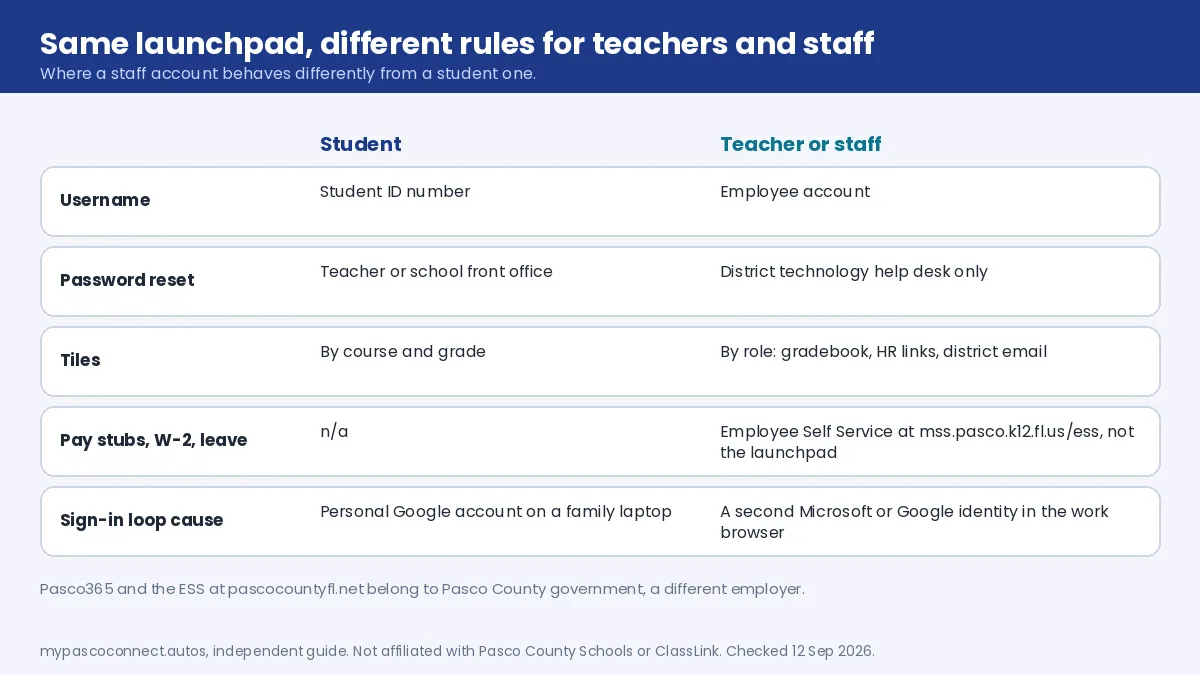
Most sign-in guidance online is written for students, and staff accounts do not follow the same rules. Two teachers in the same building will not see the same launchpad, and a tile a colleague has is not something you can add yourself. That matters when following instructions written by another teacher: "click the X tile" assumes you have been assigned X.
Lockouts
Who resets a Pasco employee password?
Like student accounts, employee credentials are district-controlled and have no public self-service reset. ClassLink operates the launchpad but does not hold district passwords, so a call to ClassLink support goes nowhere. Front-office staff can often help a student, which leads teachers to assume the same route works for them. It does not.
Have your employee ID ready when you contact the help desk. The district also publishes a DIY Tech Tips page that resolves a fair number of tickets before they are filed. Main district lines are (813) 794-2000, (352) 524-2000 and (727) 774-2000.
New hires and substitutes have a provisioning gap
An employee account is created after onboarding completes, not when you are hired, and tile assignments can follow days later. If you have started work but have no credentials, that is an HR and provisioning question; no amount of trying will produce an account that has not been issued. If you can sign in but the tools you were told to use are missing, that is a permissions question for your administrator, not a login fault.
The sign-in loop
Teacher login keeps bouncing back? Fix it in four steps
Teachers hit sign-in loops more than students because they are far more likely to have a second Microsoft or Google identity open in the same browser: a personal account, a former district, a university. The launchpad authenticates, the tile hands off, the other identity answers, and you are bounced back to the login screen.
Open a private window first
Sign in at login.classlink.com/my/dsbpc in an incognito or private window. If it works there, the account is fine and the problem is a second identity in your normal browser profile.
Sign out of the personal account
In your normal browser, sign out of the personal Microsoft or Google account, or the account from a former district or university. Better still, keep a separate browser profile for work. That is the durable fix.
Check the address
The URL must contain dsbpc. A ClassLink page that asks you to search for a district is the generic entry point and Pasco employee credentials will not authenticate there.
Contact the district help desk
If a private window with the right address still fails, it is an account issue. Have your employee ID ready; it is the first thing you will be asked for. A school front office cannot reset an employee account.
Not on the launchpad
Employee Self Service, pay stubs and Pasco365
Three things people search for alongside "mypascoconnect employee login" are not on the launchpad, and one of them belongs to a different employer entirely.
| System | Who it is for | Where it is | What it does |
|---|---|---|---|
| MyPascoConnect launchpad | Pasco County Schools staff and students | login.classlink.com/my/dsbpc | Single sign-on to classroom and district apps |
| Employee Self Service (ESS) | Pasco County Schools employees | mss.pasco.k12.fl.us/ess | Pay and personal HR records; substitutes get sign-on instructions from HR |
| Pasco County government ESS and Pasco365 | Employees of Pasco County (the county government) | pascocountyfl.net | A different employer's HR portal and Office 365. Not the school district. |
The district's Employee Self Service page lists ESS as its own link with its own address, and HR's substitute sign-on handout sends password problems to techhelp@pasco.k12.fl.us. If you are a school district employee looking for a pay advice, go to ESS directly rather than hunting for a tile. If you work for Pasco County government, none of this site applies to you.
Canvas and devices
myLearning for teachers, and the classroom machine
Canvas opens from the myLearning tile, and staff use the same SAML sign-in as students at pasco.instructure.com/login/saml. When Canvas itself misbehaves it has a support route that works independently of the launchpad: a white Help link at the bottom-left inside Canvas, and a grey Help link at the very bottom of the Canvas login screen if you cannot get in at all. Both lead to Report a Problem. Access questions go to pascocanvashelp@pasco.k12.fl.us.
Instructure's browser requirements are worth checking first; a surprising share of "Canvas is broken" reports are badly out-of-date browsers.
Shared and classroom devices
A staff session left open on a classroom machine exposes gradebook entry and district email to whoever sits down next. Closing the tab is not signing out. Worth being deliberate about on any device a student can reach.
Ready to sign in?
This guide is the how-to. The district portal is where you actually sign in, and the only place you should ever type your password.
Open the official portal ↗