
Short answer
Parents do not use MyPascoConnect, so a search for a MyPascoConnect parent login ends here. Parents use myStudent, the Pasco County Schools parent portal, which runs on Focus School Software at pasco.focusschoolsoftware.com. Sign in with the email address and password you registered, on the web or in the Pasco One app. Grades, attendance, schedules, report cards and test scores live there. Your child's launchpad password has nothing to do with it and you shouldn't be using it.
What it is
What myStudent is, and what it isn't
myStudent is a student information system portal, the parent-facing side of the Focus software Pasco County Schools uses to hold student records. The district's Parents page links it as "Parent Portal (Check Grades, Attendance, Schedules, Test Scores)". Since August 2026 the same account also signs in to Pasco One, the district's phone app, and to ONE Wallet for meal money and school fees.
There are two other parent-facing systems in Pasco and they answer different questions, which is the single most common source of confusion.
| myStudent | myLearning observer | Pasco One | |
|---|---|---|---|
| Runs on | Focus School Software | Canvas (Instructure) | Focus School Software (app) |
| Shows you | Grades, attendance, schedules, report cards, test scores | The classroom: assignments, materials, announcements | Everything in myStudent, plus transportation, forms and ONE Wallet payments |
| Account | You create it yourself, with a Parent PIN to link each child | Separate observer account, created with a pairing code from the student | Your myStudent account |
| Use it when | "What is the grade? Were they marked absent?" | "What was the assignment?" | You want it on your phone |
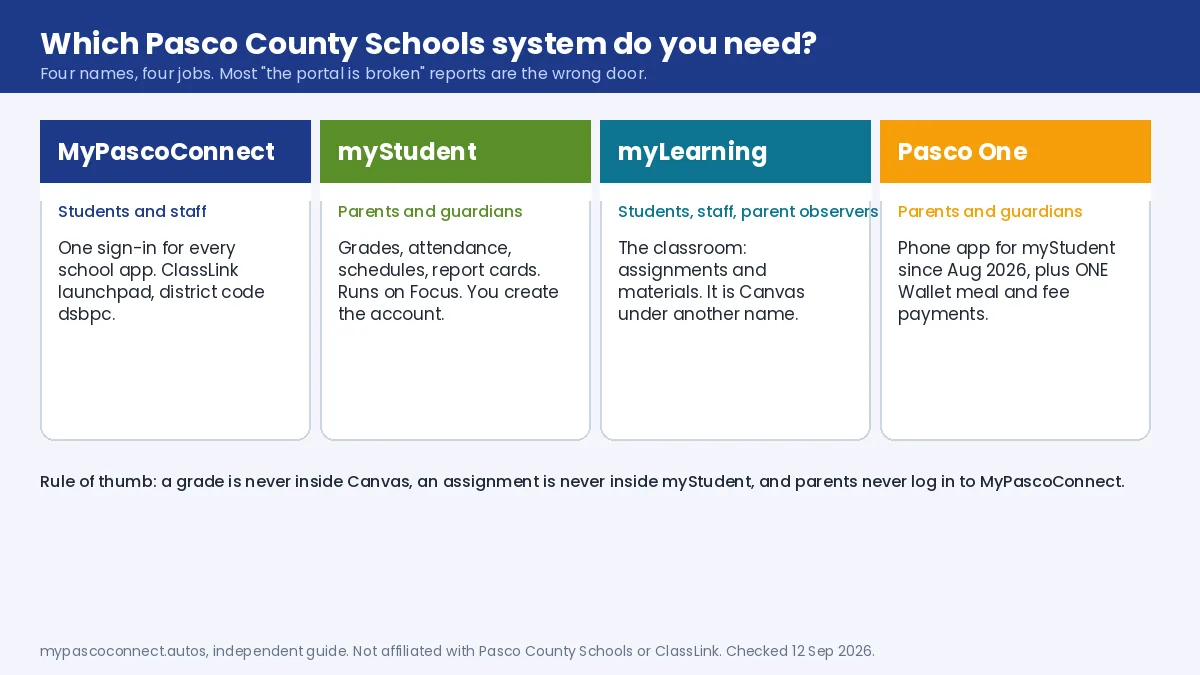
If you are hunting for a grade inside Canvas, or an assignment inside myStudent, you are in the wrong system. The observer view is set up through a different sign-in page and described in the myLearning guide.
Step by step
How to log in to the myStudent parent portal
Open the parent portal
Go to the Pasco County Schools Parents page and choose Parent Portal, or open pasco.focusschoolsoftware.com directly. This is the parent portal sign in page; it is titled Pasco County Schools and runs on Focus.
Enter your email as the username
Your username is the email address you registered the parent portal account with. It is not a student ID and not your child's launchpad username.
Enter your parent portal password
The password you set when you registered. If you have forgotten it, use the password link at the bottom of the sign-on page; the reset arrives by email in minutes.
Choose the child, then the section you need
If more than one child is linked, select the student first. Grades, attendance, the class schedule, report cards and test scores are all inside the portal. Assignments are not; they live in the myLearning observer view.
Mobile
Pasco One, the app that replaced myStudent Pasco
Pasco County Schools relaunched its parent app as Pasco One on 7 August 2026. It is the same App Store and Google Play listing that used to be called myStudent Pasco, published by Focus School Software, so an existing install simply updates. Superintendent John Legg described it as the app where parents "do all their interaction with the school district".
Inside it you get the myStudent data (grades, attendance, schedules), transportation information, district forms, and ONE Wallet, the Rycor-powered account for school fees and meal deposits. Activating ONE Wallet needs a parent portal account already linked to your student, plus an overnight sync after linking, according to the district's Food and Nutrition Services setup guide. Sign in with your myStudent email and password.
ONE Wallet
Also reachable on the web at studentquickpay.com/pasco. AutoPay, low-balance alerts, purchase history.
Source: Pasco eSchool, Pasco One announcement · FNS ONE Wallet setup guide (PDF)
Also through the portal
Schedule changes and school choice
Two things families ask this site about every August, both handled through the parent portal or the school, never through the launchpad.
Schedule changes
The current schedule shows in myStudent and Pasco One. Changing it is a school-level process. Land O' Lakes High, Pasco High, Wesley Chapel High and Sunlake High each run an online schedule change request form, and Land O' Lakes states plainly that it is "not necessary to email or call your administrator or school counselor" because every request goes through the form. LOLHS grants changes for four reasons only: the course was already completed, a prerequisite is missing, a senior needs the course to graduate, or the schedule is incomplete. Check your own school's site for its form and deadline.
School choice (Pasco Pathways)
School choice applications are completed inside the myStudent parent portal, after online registration. Parents pick up to three schools, applications go to a lottery, and each student needs a separate application. For 2026-2027 the district ran three windows: 7-20 January, 13-17 April and 15-19 June 2026, with notifications roughly six weeks after each. Reapplying in a later window cancels any earlier acceptance or waitlist place. The 2027-2028 dates had not been posted as of September 2026; the district's application process page is where they appear.
Source: Land O' Lakes High School, 2026-27 schedule change request · Pasco County Schools, school choice application process
Don't do this
Why not to use your child's MyPascoConnect login
It's tempting when the parent account is being difficult. Three reasons not to. It shows you the classroom, not the record, so grades and attendance are formatted for teachers rather than parents. The student password is also the school computer and testing password, so sharing it widens the damage from any mistake. And you lose every parent-specific feature: multiple children on one account, notification settings, report cards, ONE Wallet.
Linking more than one child
One parent account covers all your children. If a child is missing, that is a link request to the school's front office, which holds the records that connect a guardian to a student and can give you the Parent PIN. Setup is on the parent account registration page.
Who to contact
Account linking and enrolment go to your child's school. Technical portal problems go to myStudenthelp@pasco.k12.fl.us. Pasco County Schools main lines: (813) 794-2000, (352) 524-2000, (727) 774-2000.
Ready to sign in?
This guide is the how-to. The district portal is where you actually sign in, and the only place you should ever type your password.
Open the myStudent portal ↗