
Short answer
There is no app literally named MyPascoConnect. Students and staff use the ClassLink app with the district code dsbpc; it opens the same launchpad as the browser. Parents use Pasco One, the Pasco County Schools app that was called myStudent Pasco until 7 August 2026, for grades, attendance, schedules and meal payments, signing in with their myStudent account. Neither app does the other's job, and the launchpad also works fine in a phone browser at login.classlink.com/my/dsbpc.
Pick the right one
ClassLink app vs Pasco One vs the browser
Students and staff use ClassLink
Opens the same LaunchPad as the web. When it asks for your district, enter dsbpc or choose Pasco County Schools; the generic app will not find your account otherwise. Credentials are identical to the web version.
Parents use Pasco One
The district links a dedicated app, not the generic Focus one: App Store · Google Play. Sign in with your myStudent email and password.
| ClassLink app | Pasco One | Mobile browser | |
|---|---|---|---|
| Who | Students, teachers, staff | Parents and guardians | Anyone |
| Signs in to | MyPascoConnect launchpad | myStudent (Focus) and ONE Wallet | Whichever site you open |
| Needs | District code dsbpc, then launchpad credentials | myStudent email and password, child already linked | Nothing extra |
| Shows | App tiles: myLearning, Office 365, Lexia and the rest | Grades, attendance, schedules, transportation, forms, meal payments | Same as desktop |
| Common failure | Wrong district selected; tile handoff hits a personal Google account | Sections that open district web pages ask for a second sign-in | iPad Safari sign-in loop |
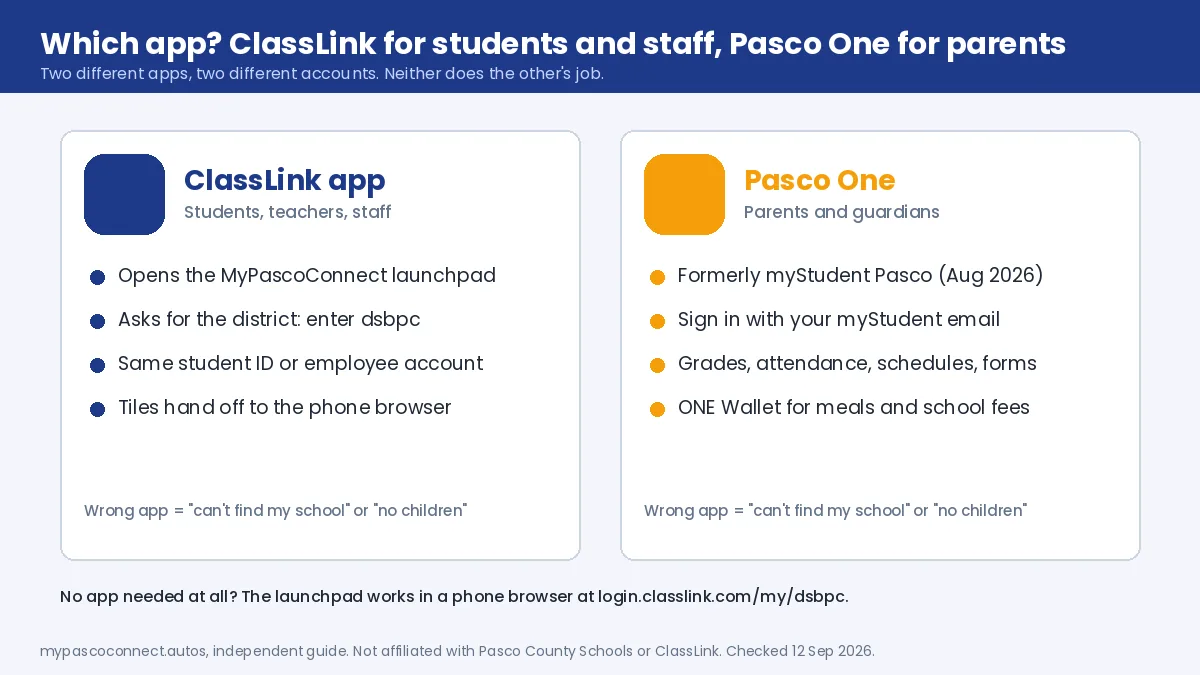
Reinstalling the ClassLink app will never fix a Pasco One login, and vice versa. They are separate systems with separate accounts, and the parent app is really a myStudent app that happens to be published by the district.
Source: Pasco County Schools, Parents page (Pasco One links)
Step by step
How to set up the ClassLink app for MyPascoConnect
Install the ClassLink app, not a Focus app
Search the App Store or Google Play for "ClassLink" and install the ClassLink LaunchPad app. Students and staff do not use Pasco One; that app only signs in parents.
Enter the district code dsbpc
When the app asks for your district, type dsbpc or choose Pasco County Schools from the search. Skipping this leaves you on the generic ClassLink entry point where Pasco credentials fail.
Sign in with your launchpad credentials
Student ID number or employee account, plus the district password. They are identical to the web version. Retype rather than accepting an autofill suggestion, which is often an old password.
Open a tile, and expect a browser handoff
Many tiles open in the phone browser or in another app. If that second step asks you to sign in again, a personal Google or Microsoft account on the phone is answering instead of the school one; sign out of it or use a private browser tab.
Parents
What changed when myStudent Pasco became Pasco One
Pasco County Schools rolled out Pasco One on 7 August 2026, and Bay News 9 reported it as replacing roughly three separate apps families used to need. The store listings did not change: the App Store entry id1536040493 and the Google Play package com.focusschoolsoftware.mystudent.pasco are the same ones that carried the myStudent Pasco name, published by Focus School Software. If you already had myStudent Pasco installed, updating it turns it into Pasco One.
What is new is ONE Wallet, powered by Rycor, for school fees and meal-account deposits, with AutoPay, low-balance alerts and purchase history. The district's Food and Nutrition Services guide says to link your student in the parent portal first, allow an overnight sync, then choose "Activate Parent Account" inside ONE Wallet with your portal email. The most common complaint in app reviews is a section that opens a district web page inside the app and asks for its own sign-in even though you are already logged in; the credentials are the same myStudent ones, and the web portal is the fallback.
Source: Bay News 9, 7 August 2026 · FNS ONE Wallet guide (PDF)
Fixes
Common mobile problems
| Issue | Cause | Fix |
|---|---|---|
| App can't find my school | Wrong district selected, or the generic ClassLink entry point | Enter dsbpc or choose Pasco County Schools explicitly. Reinstall if the choice is stuck. |
| Credentials rejected in the app but fine in a browser | Usually district selection, not the password | Confirm the district, then retype rather than autofilling. |
| ClassLink app signs in but tiles won't open | The tile hands off to a browser or app where a personal Google or Microsoft account answers, or the tile's app is not installed | Sign out of personal accounts on the phone, install the tile's app, or open login.classlink.com/my/dsbpc in the phone browser instead. |
| iPad shows the login page repeatedly | Safari's Prevent Cross-Site Tracking blocks the sign-on cookie | Settings → Safari → turn off Prevent Cross-Site Tracking, or use Chrome on the iPad. A school-managed iPad may have it locked; that is a help-desk question. |
| Pasco One keeps asking me to sign in | Sections that open district web pages inside the app ask for their own sign-in | Use the same myStudent credentials, or open the web portal in the phone browser. |
| Pasco One shows no children | Guardian linking is incomplete | Records problem: see parent account setup. |
The iPad case is worth calling out because it looks like a broken password and is not. Safari accepts your credentials and then bounces you straight back to the login screen because the cookie that single sign-on relies on was blocked. Turning the setting off for the sign-in, or using Chrome, resolves it.
Ready to sign in?
This guide is the how-to. The district portal is where you actually sign in, and the only place you should ever type your password.
Open the official portal ↗