
Short answer
A Pasco County Schools parent portal account is something you create yourself in myStudent, at pasco.focusschoolsoftware.com. It is not issued by the school and it is not your child's MyPascoConnect login. Registering takes your name, email and a password. Linking a child takes the Pasco student ID, the child's date of birth and a Parent PIN from the school, and that second step is where almost everyone gets stuck, because the school has to confirm you are a listed guardian.
Step by step
How to create a Pasco parent portal account and link your child
The sequence below follows the district's own myStudent handout, most recently reissued by Wesley Chapel High in August 2024, plus the Parent PIN detail from Kirkland Ranch Academy of Innovation's parent portal page.
Open the parent portal registration page
From the district's Parents page choose Parent Portal, or go to pasco.focusschoolsoftware.com. Below the sign-in box, choose the link to register for a new account.
Choose "I DO NOT have a Parent Portal Account"
Fill in every required field with your own details, not your child's. Use an email address you will keep, because grade alerts, attendance notifications and district messages all route to it.
Add your child with the student ID, date of birth and Parent PIN
For an already-enrolled student the form asks for the Pasco student ID, the child's date of birth and the Parent PIN, which the school issues. The front office can look up the student ID; the PIN comes from the school as well.
No PIN? Use the orange button
The district's handout says to select the orange button "I would like to reenroll or link to an enrolled child and forgot my info" if you do not have the PIN. It routes you through identity checks instead.
Add any other children, then finish
Repeat the add-a-child step for each student, then select "I am FINISHED adding students. Please take me to the Portal". One account holds all your children.
Sign in with your email and new password
Your username is the email address you registered with. Pasco One uses the same account, so the app works as soon as the web portal does. Allow an overnight sync before activating ONE Wallet.
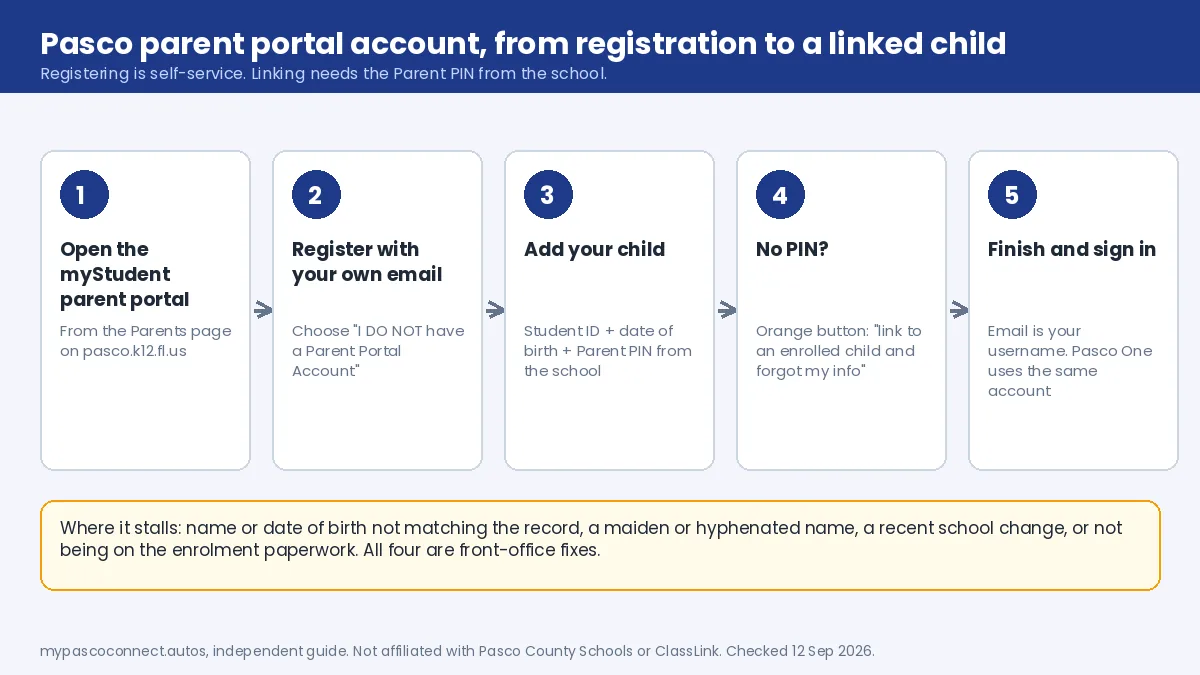
Source: Wesley Chapel High School, Creating a Parent Portal Account (PDF) · Kirkland Ranch Academy, Parent Portal Information
Where it stalls
Why linking a student fails
The link between a guardian and a student is a student-records relationship, not a website setting. The school has to be able to confirm you are listed as a guardian for that child. If you are not on the record, no amount of retrying the form will work; the record has to be corrected first, at the school.
Details don't match
The name or date of birth entered does not exactly match the student record. One transposed digit is enough.
Listed under another name
A maiden name, a hyphenation, a middle initial the school has and you didn't type.
Recent school change
The student moved schools and the record has not settled. Give it a few days, then ask the new school.
Not on the paperwork
You are a guardian in practice but not on the enrolment record. That is an enrolment-services fix, not a portal one.
All four are front-office problems, not technical ones. The school can see what the record says; a help desk cannot change it. If the portal itself is misbehaving, myStudenthelp@pasco.k12.fl.us is the technical contact.
Once it works
What the parent account gives you
One account, all your children, on the web and in the Pasco One app. The parent view covers grades, attendance, schedules, report cards and test scores. Three more things hang off the same account and are worth knowing before you need them.
| Feature | Where | What you need first |
|---|---|---|
| Pasco One app (formerly myStudent Pasco) | App Store and Google Play | Your myStudent email and password. Nothing extra. |
| ONE Wallet (school fees and meal money) | Inside Pasco One, or studentquickpay.com/pasco | A linked student, then an overnight sync, then "Activate Parent Account" with your portal email |
| School choice application (Pasco Pathways) | Inside the myStudent portal | Completed online registration. Up to three choices per student; lottery; each child applies separately |
Pasco One launched on 7 August 2026 and replaced the myStudent Pasco app on the same store listings. The district's Food and Nutrition Services guide for ONE Wallet is explicit that you must already "have a Parent Portal account for myStudent via Pasco ONE" and be linked to your student before activating.
Source: Pasco County Schools, Student fees (Rycor) · School choice application process
A second account
The classroom view is separate
Finishing myStudent registration does not give you a view of the classroom. Assignments, course materials and announcements are in myLearning (Canvas), and seeing them means a separate observer account, created at pasco.instructure.com/login/canvas with a pairing code your student generates from Canvas under Account, Settings, Pair with Observer. The steps are in the myLearning guide.
Rule of thumb: grades and attendance, myStudent. Assignments, myLearning observer. If you want both views, you set up both.
Do not register using your child's credentials
It seems like a shortcut when the parent form is being difficult. It produces a student view rather than a parent one, drops multi-child linking and notifications, and the student password is also the school computer and testing password.
Ready to sign in?
This guide is the how-to. The district portal is where you actually sign in, and the only place you should ever type your password.
Open the myStudent portal ↗