
Short answer
You cannot reset a MyPascoConnect password yourself. The password belongs to Pasco County Schools, not to ClassLink and not to any website. A student asks the teacher of their course or the school front office; a staff member contacts the district technology help desk; a parent has no MyPascoConnect password at all and resets their separate myStudent account by email. There is no "forgot password" link that works on a district-issued account.
The thing most guides get wrong
It is one password, not four
Your MyPascoConnect login password is not a separate portal password. Pasco eSchool's technical support page says the district-assigned password is the same one used for Moodle, for signing in to a school computer, and for testing. Changing it in one place changes it everywhere.
School computer works?
Then that same password opens the launchpad. You are not locked out; you are probably typing an older one, or the wrong username.
Reset for testing?
Your launchpad password changed at that exact moment, and your browser is still offering the old one.
One password
There is no portal-only password to fix separately. A launchpad reset is a district credential reset.
Source: Pasco eSchool, Technical Support
By role
Who resets what, and roughly how long it takes
Which route applies depends entirely on which of the three systems you are locked out of, and a district password is not a self-service consumer account.
| Student | Teacher or staff | Parent | |
|---|---|---|---|
| System | MyPascoConnect launchpad | MyPascoConnect launchpad | myStudent (Focus) and Pasco One |
| Who resets it | Teacher of the course, or the school front office | District technology help desk only | You, from the myStudent sign-in page |
| What to ask for | "My district-assigned password." Not a ClassLink password. | Employee account reset. Have your employee ID ready. | Nothing; click the password link at the bottom of the sign-on page and enter your email |
| Self-service? | No | No | Yes, by email |
| Typical wait | Same day, often in class | Depends on the help-desk queue | Minutes |
| What else it changes | School computer, Moodle and testing logins | Every district system on the same account | Pasco One, which signs in with the same account |
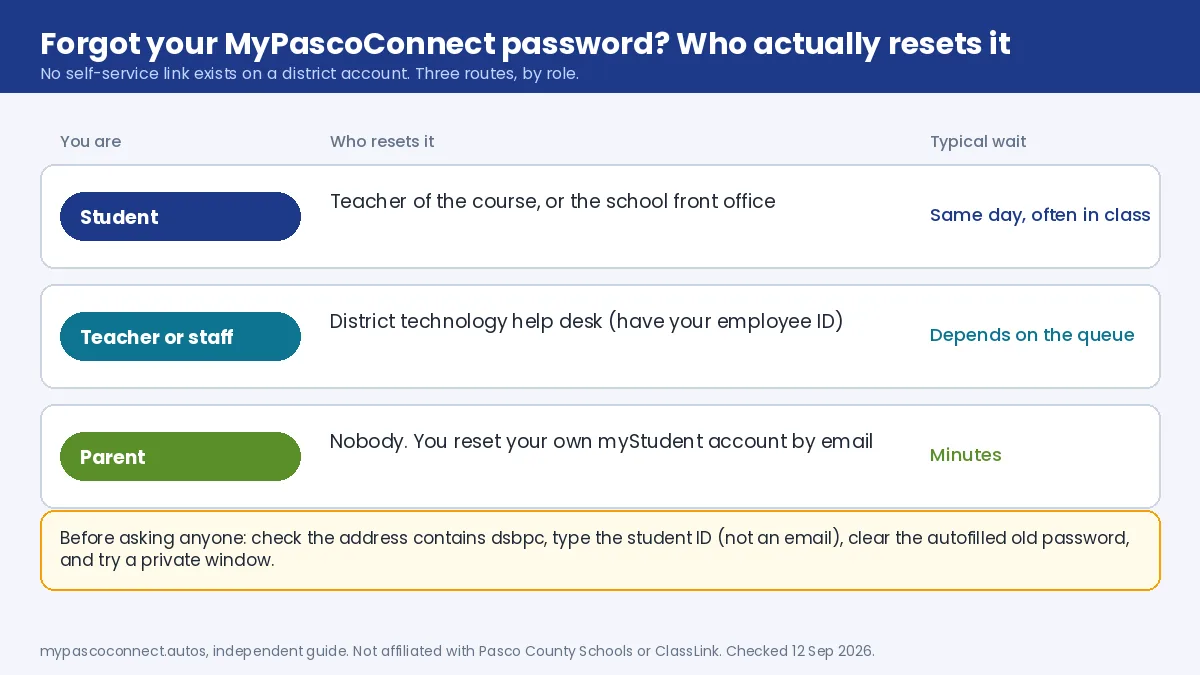
The last row is the one people miss. If a student says the school computer stopped accepting their password the day after a reset, that is the reset working correctly. The parent handout from Wesley Chapel High confirms the parent route: username is the email used to create the account, and a forgotten password is recovered from "the link at the bottom of the sign-on page".
Source: Wesley Chapel High School, Create a Parent Portal account (PDF)
Parents
Parents, you are probably on the wrong page
If you are a parent trying to see grades or attendance, you do not need a MyPascoConnect password and you should not be using your child's. Parents use myStudent, which runs on Focus School Software and is a completely separate account you create yourself. Its password reset works normally, by email, and the Pasco One app signs in with that same account. See the parent portal guide.
Before you ask anyone
Five checks before you request a password reset
Four of these take under a minute and rule out the things that look like a bad password and aren't. Only the fifth involves another person.
Check you are on the district's portal
The address Pasco links from its own Students page is login.classlink.com/my/dsbpc. If dsbpc is missing you are on another district's launchpad and your password will always fail there.
Check the username, not the password
Students type the student ID number, not an email address. Staff type the employee account. A "wrong password" error is very often a wrong-username error.
Clear any saved old password
Browsers autofill the previous password after a district reset, and a testing-day reset changes the launchpad password at the same time. Delete what is in the box and type it fresh.
Try a private window
If a personal Microsoft or Google account is signed in to the same browser, the sign-on can loop and look like a rejected password. One attempt in an incognito window tells you whether that is the cause.
Ask the right person
Students: the teacher of the course or the school front office. Staff: the district technology help desk with your employee ID. Parents: use the email reset on the myStudent sign-in page, because a parent has no MyPascoConnect password at all.
Contact
Where to reach the district
Pasco County Schools, 7227 Land O' Lakes Blvd, Land O' Lakes, FL 34638. Main lines (813) 794-2000, (352) 524-2000, (727) 774-2000. The district publishes a department directory and a DIY Tech Tips page. Parent portal technical questions go to myStudenthelp@pasco.k12.fl.us.
Never use a third-party "password reset" page. No site other than the district can reset a district account, and any page that offers to, or asks for your current password in order to "fix" the account, is collecting credentials. That includes this site: we have no login form and no access to any account.
Ready to sign in?
This guide is the how-to. The district portal is where you actually sign in, and the only place you should ever type your password.
Open the official portal ↗